
Québec Ministry of Cybersecurity and Digital Technology (MCN)
SUP-02 — Deploying, administering and troubleshooting enterprise applications with SCCM/Intune
Deployment, upgrade, removal and troubleshooting of Windows applications with SCCM/MECM and Microsoft Intune: targeting, detection rules, client logs, return codes and documented remediation.
- Period
- July 2023 – present
- My role
- Modern Workplace systems engineer (consultant)
- Organization
- Québec Ministry of Cybersecurity and Digital Technology (MCN)
Technologies
- Microsoft SCCM / MECM
- Microsoft Intune
- Windows 10/11
- MSI / MSIX
- PowerShell
- Software Center
- Microsoft Entra ID
On this page
- Recruiter summary
- Context and objectives
- Technical environment and documented responsibilities
- Conceptual SCCM/MECM architecture
- Conceptual Microsoft Intune architecture
- Deployment workflow
- Deployment-failure diagnostic tree
- Controlled remediation methods
- SCCM/MECM and Intune comparison
- Documentary demonstration — fictional application
- Demonstrated skills and verifiable scope
Recruiter summary
At the Québec Ministry of Cybersecurity and Digital Technology (MCN), I work across the Windows application lifecycle: deployment, upgrade, removal, device targeting, troubleshooting failed installation and applying fixes. SUP-02 presents that practice through SCCM/MECM and Microsoft Intune mechanisms: package preparation, silent command, detection rule, assignment, distribution, installation, verification and documented anomaly handling.
Context and objectives
Deploying an application is more than running an installer. It must be prepared for silent installation, identifiable afterward, targeted to the correct scope and observable when it fails. On Windows 10/11, incidents may arise from the client, policy reception, content availability, execution context, a dependency, a return code or an unsuitable detection rule.
- Deploy, upgrade or remove an application in a controlled manner.
- Manage SCCM/MECM collections and Intune/Entra ID assignments for the appropriate audience.
- Distinguish Available applications requested by users from Required applications enforced for the assigned scope.
- Analyze client logs and return codes to find the cause instead of reinstalling without a diagnosis.
- Apply a fix and verify a new evaluation before closing the incident.
- Document method, scope and outcome without disclosing organizational data.
Technical environment and documented responsibilities
| Component / responsibility | Role in the application lifecycle |
|---|---|
| SCCM / MECM | Applications, packages, collections, policy, content distribution, client status and Software Center |
| Microsoft Intune | Win32, MSI or MSIX applications, assignments, requirements, detection and cloud reports |
| Windows 10/11 | Managed endpoint that evaluates policy, downloads, installs, detects and reports status |
| MSI / MSIX and PowerShell | Silent commands, product/return-code handling, documented checks and fixes |
| Professional responsibilities | Application deployment, upgrade and removal; targeted collections/deployments; installation-error diagnosis; SCCM log and return-code analysis; applying fixes |
Conceptual SCCM/MECM architecture
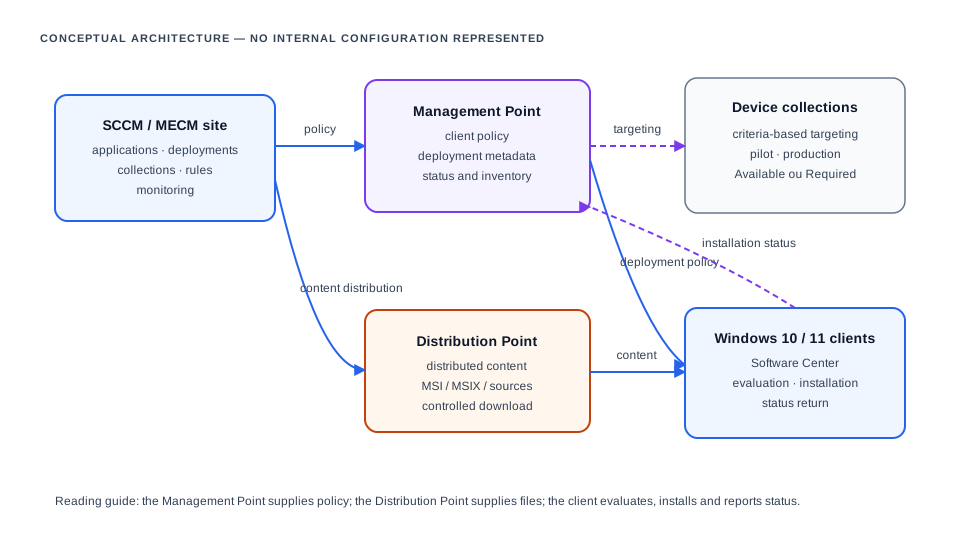
SCCM applications, packages, collections and deployments
An SCCM application describes intent: deployment type, commands, detection, requirements, dependencies and user experience. A package/program is a more direct distribution and execution method without the same application-detection model. The appropriate choice depends on organizational standards and installer characteristics; this case study does not presume the model chosen for a specific MCN application.
Device collections enable staged targeting based on approved criteria. An Available deployment is offered through Software Center and initiated by an authorized user. A Required deployment is evaluated and installed according to its deadline. Package, command, detection and targeting are validated in an authorized pilot scope before wider rollout.
Conceptual Microsoft Intune architecture
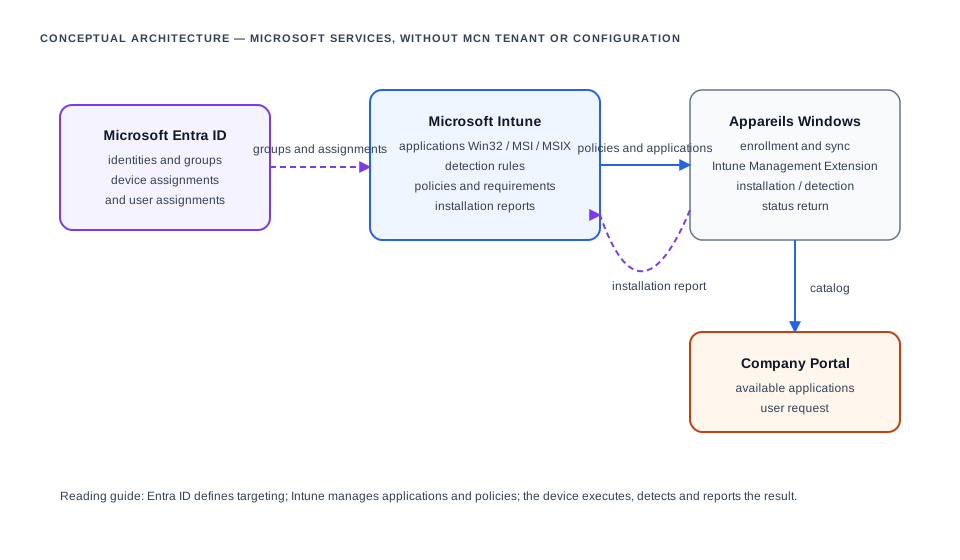
For a Win32 application, Intune distributes packaged content, install/uninstall commands, detection rules and, when needed, requirements or dependencies. Assignment relies on Entra ID user or device groups. Installation reporting is useful, but an incident is cross-checked with device state, assignment, synchronization and Intune Management Extension logs when appropriate.
Deployment workflow
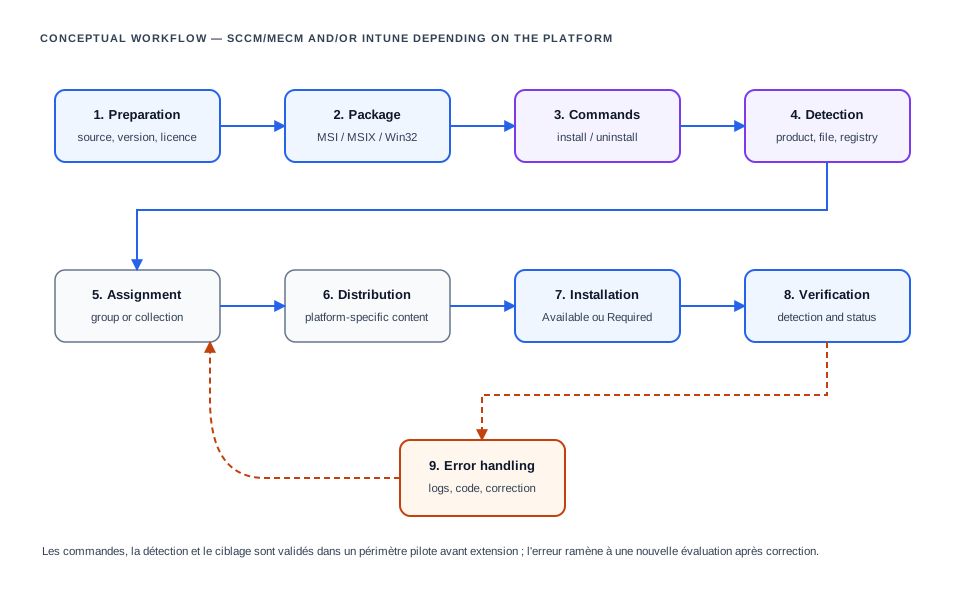
- Prepare source, version, prerequisites and expected behavior.
- Create the appropriate MSI, MSIX or packaged Win32 content.
- Define silent install and uninstall commands in the appropriate context.
- Configure reliable detection through product code, file, registry value or version.
- Assign to an SCCM/MECM collection or Entra ID group, starting with a validated pilot scope.
- Distribute content through a Distribution Point or the Intune service.
- Install as Available or Required.
- Verify detection, deployment state and endpoint behavior.
- Treat errors, document the fix and trigger a controlled re-evaluation.
Deployment-failure diagnostic tree
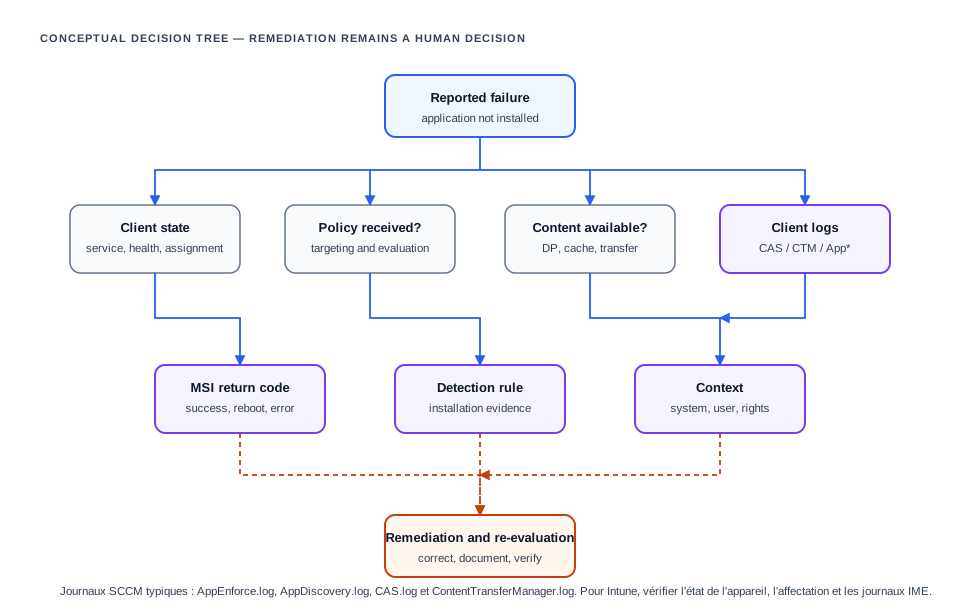
| Log | Diagnostic question |
|---|---|
AppEnforce.log | Which command ran, in which context and with which return code? |
AppDiscovery.log | Does detection consider the application already present or absent? |
CAS.log | Can the client locate and prepare required content? |
ContentTransferManager.log | Is content download or transfer initiated and complete? |
Read the sequence chronologically: confirm that the client receives the targeted deployment, reaches content, runs the planned command, then that detection sees the expected outcome. MSI values such as 0 (success), 3010 (success with required restart) or 1603 (generic error) are never interpreted alone; they are correlated with vendor documentation, logs and execution context.
Controlled remediation methods
| Isolated cause | Controlled remediation | Verification |
|---|---|---|
| Targeting or policy absent | Check collection/group, assignment and policy receipt | New evaluation and deployment visible on client |
| Content unavailable | Check distribution, connectivity and cache as appropriate | Download completes before controlled retry |
| Invalid command or dependency | Correct package, silent parameter or dependency after validation | Command and sequence confirmed in pilot scope |
| Detection too broad or strict | Correct evidence of presence without confusing an old trace for installation | AppDiscovery.log or Intune state matches the real installation |
| Return code / context | Check rights, required restart, conflicting process or prerequisite | New installation and documented final state |
Concrete actions are performed under applicable authorization and operational procedures. This page describes no automatic production change, broad redeployment or content removal.
SCCM/MECM and Intune comparison
| Aspect | SCCM / MECM | Microsoft Intune |
|---|---|---|
| Targeting | Device or user collections | Microsoft Entra ID groups |
| User catalog | Software Center | Company Portal |
| Content | Distribution Points and client cache | Intune cloud service and device-side download management |
| Application | Application/deployment type or package/program | Win32, MSI, MSIX or other supported application type |
| Detection | Detection method tied to deployment type | Application detection rules, notably Win32 |
| Visibility | Status, reports and SCCM client logs | Intune reports, device state and relevant agent logs |
Documentary demonstration — fictional application
The following is a fictional design sheet for Contoso Reader 5.4. It illustrates documentation elements only; it is not an MCN package or deployment.
Fictional name   : Contoso Reader 5.4
Install          : ContosoReader-5.4-x64.msi /qn /norestart
Uninstall        : msiexec.exe /x {00000000-0000-0000-0000-000000000000} /qn /norestart
Detection        : fictional MSI product code or registry value
Context          : system, 64-bit
Pilot targeting  : fictional demonstration group / collection
Fictional AppEnforce.log example
Prepared command line: msiexec.exe /i "ContosoReader-5.4-x64.msi" /qn /norestart
Process completed with exit code 3010
Detection evaluation: application detected; restart requiredThe diagnostic procedure confirms targeting, policy receipt and content, reads AppEnforce.log, interprets 3010 as a successful installation requiring restart, validates detection and records the outcome. Identifiers and log lines are fictional.
Demonstrated skills and verifiable scope
| Area | Demonstrated capability |
|---|---|
| Application deployment | Packaging, silent commands, upgrade, removal, detection and dependencies |
| SCCM / MECM | Collections, targeted deployments, Software Center, policy, content and client logs |
| Microsoft Intune | Win32 applications, Entra ID assignments, requirements, detection and installation reports |
| N2/N3 troubleshooting | Log reading, return codes, execution context and root-cause isolation |
| Operations | Pilot validation, traceability, re-evaluation and result communication |
- Documented responsibilities include deployment, upgrade, removal, targeting, diagnostics, log analysis and applying fixes.
- Four published diagrams explain SCCM/MECM, Intune, workflow and diagnostics without representing MCN internal architecture.
- No device volume, success rate, server name, group, tenant or metric is invented; such indicators remain to be completed only if publication is authorized.