La Poste du Burkina Faso
Business continuity and virtual machine protection
Day-to-day monitoring of two complementary protection mechanisms: EMC RecoverPoint replication to a remote site, tracked by consistency group and RPO/RTO indicators, and Commvault backups — jobs, retention and restores.
- Period
- July 2015 – February 2022
- My role
- Regional IT Division Manager
- Organization
- La Poste du Burkina Faso
Technologies
- EMC RecoverPoint
- Commvault
- VMware vSphere
- vCenter
- Dell EMC
- PRTG
On this page
Summary
From 2015 to 2022 I monitored, day to day, the data protection mechanisms of La Poste du Burkina Faso, an ISO 9001 certified organization with 119 branches and more than 1,100 employees. Two complementary mechanisms covered the virtual machines: EMC RecoverPoint replication to a remote site, where I tracked consistency groups and recovery point and recovery time indicators, and Commvault backups, where I oversaw jobs, retention policies and restores. My role sat in operations and monitoring, within a documented framework that met the certification’s audit requirements.
Technical context
La Poste du Burkina Faso’s business services, including the mail management application, ran on a VMware virtualized platform serving the entire branch network. A prolonged outage was not an internal inconvenience: it blocked counter operations in the branches.
Two distinct risks had to be covered, and they do not call for the same answer. On one side, data loss or corruption — accidental deletion, application error, gradual damage — where you need to return to an earlier state, sometimes an old one. On the other, loss of equipment or of a site, where you need a remote copy already in place, as close as possible to the current state.
The infrastructure therefore combined Commvault for long-retention backup and EMC RecoverPoint for replication to a recovery site, on Dell EMC hardware. ISO 9001 certification required these operations to be documented and auditable: backup jobs, retention policies and recovery objective tracking had to leave a usable trail rather than rest on the operator’s memory.
System protection objectives
- Guarantee that lost data can be retrieved, to a history depth set by the retention policy.
- Maintain a usable remote copy of the production volumes, so that losing equipment or a site does not mean losing the data.
- Track recovery objectives explicitly — recovery point (RPO) and recovery time (RTO) — per consistency group, rather than estimating them after an incident.
- Detect failing protection without delay: failed backup job, lagging replication, consistency group in error.
- Verify that restores actually work, since a backup never read back is only a hypothesis.
- Document operations to the standard required by ISO 9001 certification.
My role in operations
Regional IT division manager, accountable for operating the virtualization platform, disaster recovery and backups. On the data protection side, my work was to monitor, track and report: check daily that the mechanisms in place were doing their job, handle or escalate anomalies, and brief executive management during incidents.
My monitoring responsibilities
- Monitoring EMC RecoverPoint replication: link state, detection of replication lag and state transitions.
- Tracking consistency groups: verifying that each group stayed healthy and contained the expected volumes.
- Monitoring RPO and RTO indicators per consistency group, and reporting deviations from the agreed objectives.
- Overseeing Commvault backups: job tracking, handling failures and pending jobs.
- Tracking the retention policies applied to the different data sets.
- Following restore requests from intake through to verification of the result.
- Infrastructure monitoring with PRTG, to detect degradation — including on the links used by replication — before users reported it.
- Maintaining the operating documentation required by ISO 9001 certification.
Technical architectures
1. Commvault backup architecture
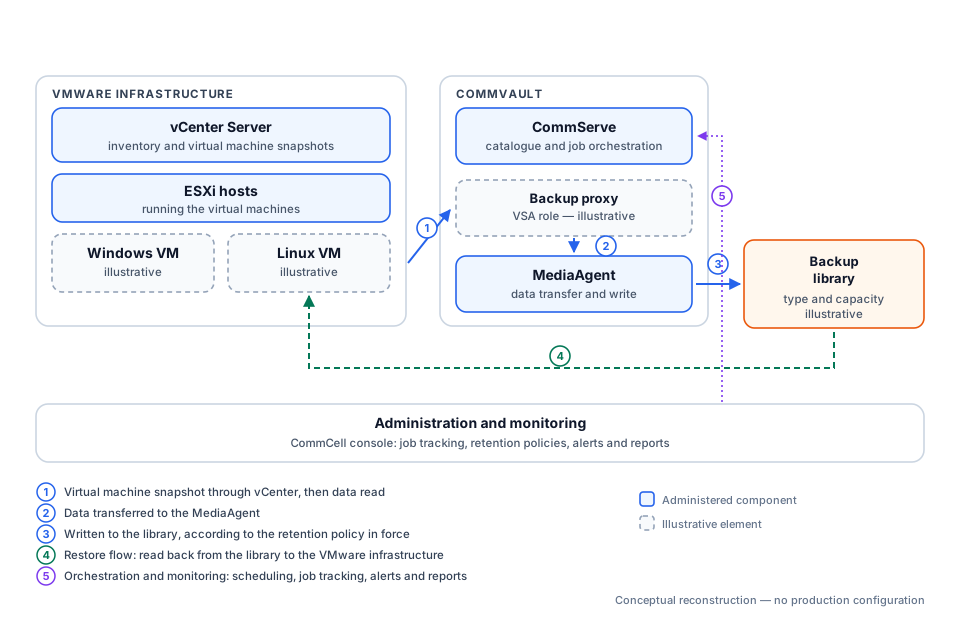
How to read it. Backing up a virtual machine is not a matter of copying a running server: its state is first frozen through a snapshot taken via vCenter, then the data is read from that frozen image, which avoids producing an inconsistent file. The backup proxy performs that read, the MediaAgent moves and writes the data, and the CommServe holds the catalogue — the record of what was backed up, when, and where it sits. Without that catalogue, the data in the library exists but cannot be used.
The restore path (4) runs the other way: the library returns the data, which goes back to the VMware infrastructure. The orchestration loop (5) is the one I operated day to day — scheduling, job tracking, alerts and reports.
2. RecoverPoint replication architecture
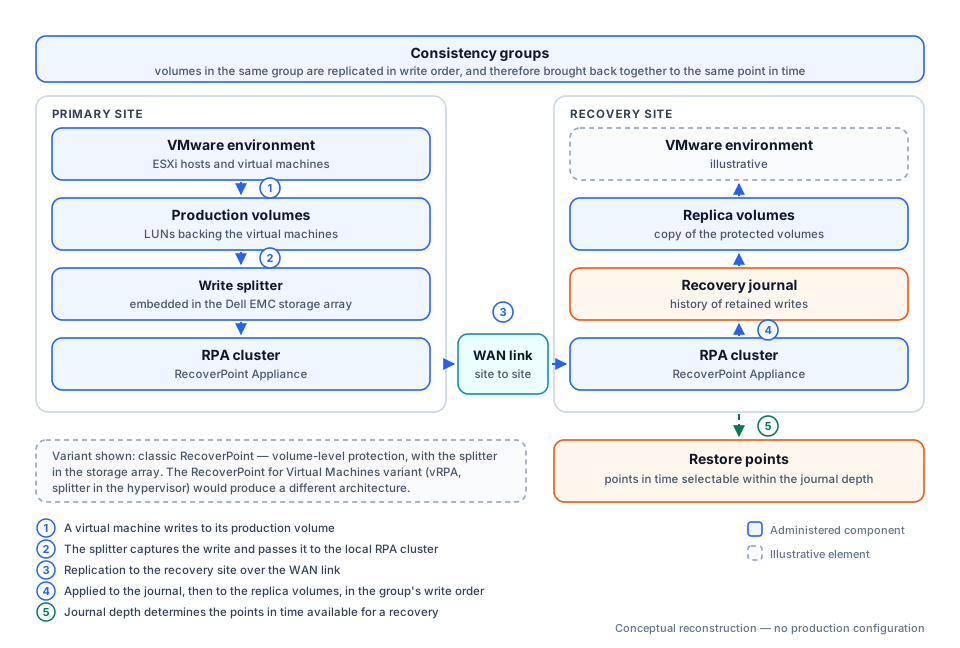
How to read it. Every write a virtual machine makes to its production volume is duplicated in passing by a component called a splitter: the original continues to the disk, the copy goes to the RPA cluster, which ships it to the recovery site. There, the write is not applied straight to the copy: it goes through a journal first, which keeps a history. That journal is what allows a return not only to the last known state, but to a chosen earlier point in time — valuable when the incident is data corruption rather than a hardware failure.
Consistency of the chosen variant. The diagram shows classic RecoverPoint, where protection applies to volumes and the splitter sits in the storage array — consistent with a Dell EMC environment. The product’s other variant, RecoverPoint for Virtual Machines, places virtual appliances (vRPA) and a splitter in the ESXi hypervisor, and protects virtual machines individually: the diagram’s components would then be different. My CVs do not state which variant was operated; the choice of representation is therefore stated explicitly in the diagram itself, rather than presented as a fact.
3. Business continuity chain
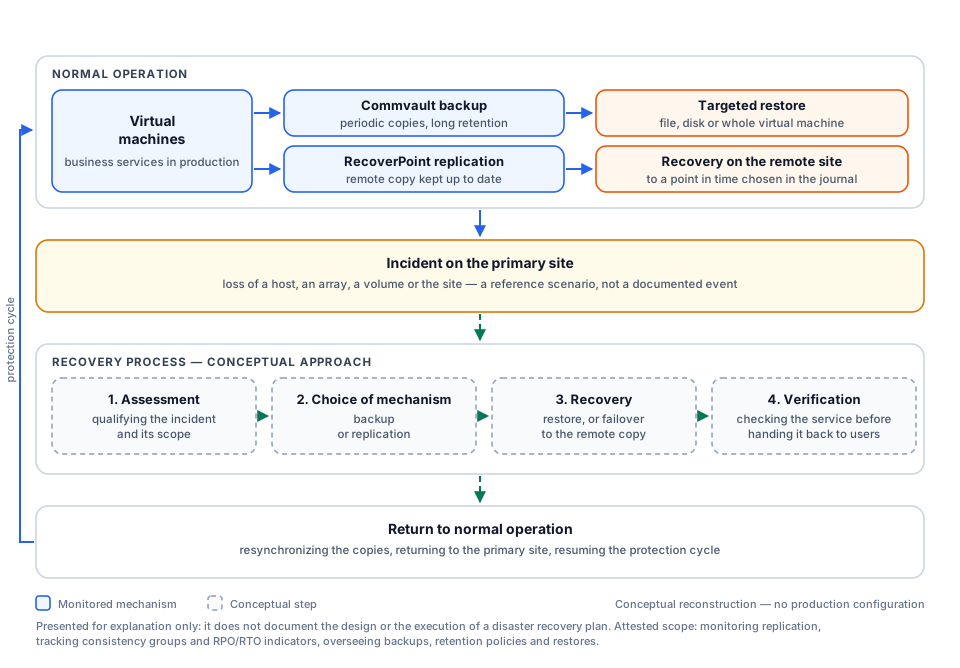
How to read it. Read it top to bottom. At the top, normal operation: one virtual machine is covered by two mechanisms that do different jobs — backup opens onto a targeted restore with long retention, replication opens onto a remote recovery at a recent point in time. In the middle, the incident, then the four-step recovery approach. At the bottom, the return to normal operation, closing the loop: copies are resynchronized and protection resumes. The return arrow on the left makes that cyclical nature visible — protection is not a state you acquire, it is a loop you maintain.
Technical explanation
Backup and replication: two answers to two risks
This is the most misunderstood distinction in the field, and the one that costs the most when it is ignored.
Replication keeps a remote copy as close as possible to the current state. It protects against losing equipment or a site. But it faithfully replicates whatever happens: if data is deleted or corrupted on the primary site, the deletion or corruption travels to the copy. Without a history mechanism, replication alone does not protect against error.
Backup produces periodic copies kept over time. It protects against error, corruption and logical destruction, because you can return to an earlier state. In exchange it is older by construction: between two backups, recent writes exist nowhere else.
The two are therefore complementary, and neither replaces the other. That is exactly the arrangement the third diagram shows.
What Commvault does
Commvault is the backup platform. The CommServe is its brain: it holds the catalogue and triggers jobs on their schedule. The MediaAgent is the muscle: it moves the data and writes it into the backup library. Retention policies determine how long each copy is kept, and therefore how far back it is possible to go.
What RecoverPoint does
RecoverPoint handles replication. Its principle is write capture: a splitter duplicates each write towards an RPA cluster, which ships it to the remote site. What sets it apart from plain replication is the journal, which keeps a depth of history and allows the point of return to be chosen, instead of being limited to the last known state.
Consistency groups
An application almost never lives on a single volume: a database, for instance, writes its data and its transaction log separately. If those two volumes are replicated independently, nothing guarantees they arrive in the right order — and a database restored from desynchronized volumes may be unusable.
The consistency group solves exactly that: volumes in the same group are replicated respecting write order and brought back together to the same point in time. This is why tracking them is an operational task in its own right: one volume forgotten when a server is added, and the group’s consistency no longer holds — without an alarm necessarily saying so.
RPO and RTO
Two distinct objectives, often confused.
RPO (Recovery Point Objective) is the amount of data you accept losing, expressed in time: a fifteen-minute RPO means that after an incident, up to fifteen minutes of writes may be gone. It depends on how frequently protection runs.
RTO (Recovery Time Objective) is the outage duration accepted before the service is back. It depends on how fast the recovery procedure is, not on how often copies are taken.
Both should be set by the business, not by IT, then verified in operation. Tracking them per consistency group — which is what I did — means continuously comparing the real gap against the stated objective, and reporting drift.
Retention
Retention sets how long each copy is kept. Too short, and you cannot go back past a corruption that went unnoticed for several weeks. Too long, and it fills the storage and eventually makes backup jobs fail — a counter-intuitive but classic effect: trying to keep everything is how you stop being protected. Tracking it is therefore both a compliance task and a capacity task.
Restore
The restore is the only moment when protection proves it exists. It may be targeted — a file, a disk — or cover a whole virtual machine. Two things matter operationally: the catalogue must be available and current, otherwise backed-up data stays out of reach; and the restore must have been tested, because unreadable media or an incomplete job are never discovered at a convenient time.
Monitoring operations
Day-to-day monitoring watches four signals: backup jobs (failures, pending jobs, run times creeping up), replication state (lag, link interruption, group in error), capacity (library space, journal depth) and deviation from RPO and RTO objectives.
One principle guides this work: the absence of an alert is not proof that things work. A job that never fired produces no failure — it produces nothing at all, which is harder to spot than an outright error.
Risks and points of failure
| Point of failure | Consequence | Signal to watch |
|---|---|---|
| Backup catalogue unavailable | Data present but not restorable | CommServe backup and health |
| Replication journal full | Loss of history depth, return limited to the last state | Journal usage |
| Degraded WAN link | Replication lag, real RPO worse than the objective | Replication gap per group |
| Volume missing from a consistency group | Inconsistent recovery of the application concerned | Group membership |
| Backup library full | Failed jobs, protection interrupted | Capacity and usage trend |
| Job unscheduled or disabled | Silent absence of protection | Gap between inventory and active jobs |
| Restore never tested | Protection assumed, not demonstrated | Test frequency and outcome |
Achievements
- Daily monitoring of RecoverPoint replication, tracking consistency groups and handling the anomalies detected.
- Tracking RPO and RTO indicators per consistency group, and reporting deviations from objectives.
- Overseeing Commvault backups: job tracking, restarting or escalating failures.
- Tracking the retention policies applied to the protected data sets.
- Following restores, from the request through to verification of the result.
- Monitoring the infrastructure and the regional WAN with PRTG, to detect degradation liable to affect protection.
- Documenting operational activities, to the standard required by ISO 9001 certification.
- Coordinating incidents with executive management, as division manager.
Demonstrated skills
| Area | How it was applied on this engagement |
|---|---|
| Replication monitoring | Day-to-day operation of EMC RecoverPoint to a recovery site |
| Consistency group tracking | Verifying group health and membership |
| Recovery objective tracking | Monitoring RPO and RTO indicators, reporting deviations |
| Backup oversight | Commvault job tracking, failure handling |
| Retention policy management | Tracking the retention periods applied |
| Restore follow-up | Supporting requests through to verification |
| Infrastructure monitoring | PRTG across the infrastructure and the regional WAN |
| Operating under audit constraints | Documented procedures meeting ISO 9001 requirements |
Result
- Both protection mechanisms were monitored daily and anomalies handled or escalated.
- Recovery objectives were tracked explicitly per consistency group rather than estimated after an incident.
- Operating procedures were documented, which satisfies ISO 9001 certification requirements.
- RPO and RTO: objectives defined according to service criticality and tracked per protection mechanism.
- Deviations: analyzed from replication status, backup jobs and operational alerts.
- Protected scope: virtual machines and data belonging to the services covered by the protection mechanisms.
- Restore tests: performed under authorized procedures and windows; detailed results are not published.
- Consistency groups: tracked within the assigned replication scope, without disclosing their number or names.
Visuals and evidence
The three diagrams above are conceptual reconstructions produced for this portfolio; their sources are versioned alongside the site.
Published diagrams describe the recovery mechanisms without exposing dashboards, group names, volumes or internal data.