
La Poste du Burkina Faso
Administering a VMware virtualized infrastructure
Administering a VMware vSphere environment — ESXi hosts, vCenter, clusters, virtual machines and resources — with a contribution to vSAN distributed storage administration, for an ISO 9001 certified organization of 119 branches.
- Period
- July 2015 – February 2022
- My role
- Regional IT Division Manager
- Organization
- La Poste du Burkina Faso
Technologies
- VMware vSphere
- ESXi
- vCenter
- vSAN
- Hyper-V
- Dell EMC
- PowerCLI
- PRTG
On this page
Summary
For close to seven years I administered the VMware virtualization platform of La Poste du Burkina Faso, an ISO 9001 certified organization whose network covers 119 branches and more than 1,100 employees. My scope spanned ESXi hosts, the vCenter server, vSphere clusters and the lifecycle of Windows and Linux virtual machines, along with the allocation of compute, memory and storage resources. I also contributed to the administration of vSAN distributed storage. The platform hosted the organization’s business services, including the mail management application, and was backed by verified replication and backups.
Technical context
La Poste du Burkina Faso is a national operator: its services must stay reachable from the entire branch network, including regional sites connected over a WAN. Virtualizing the server estate was the foundation of that availability — it consolidates several business services onto fewer physical servers, isolates workloads from one another, and allows a service to be rebuilt without depending on one particular piece of hardware.
The organization’s ISO 9001 certification added a structural constraint: operational activities had to be documented and auditable, not left to one administrator’s implicit knowledge. This applied to virtual machine provisioning procedures as much as to backup and restore-test tracking.
The environment combined VMware vSphere as the primary platform with Hyper-V for part of the Windows server estate. Storage ran on Dell EMC hardware, with a contribution to the administration of vSAN, the distributed storage built into vSphere. Disaster recovery relied on EMC RecoverPoint and backups on Commvault.
Administration and operations objectives
- Maintain availability of the business services hosted on the platform for the entire branch network.
- Allocate and arbitrate resources — compute, memory and storage — across virtual machines based on real application demand.
- Control the virtual machine lifecycle: creation, sizing, modification and decommissioning, all under written procedures.
- Guarantee recovery capability through replication and backup, with recovery point (RPO) and recovery time (RTO) objectives tracked explicitly.
- Detect degradation before users do, through continuous monitoring of the infrastructure and the regional WAN.
- Document operations to a standard compatible with ISO 9001 audit requirements.
My role and responsibilities
Regional IT division manager, accountable for the virtualization platform, disaster recovery and backups. Beyond technical operations, the role covered budget management, IT and network equipment procurement, and incident coordination with executive management.
Day to day, my responsibilities covered ESXi host and vCenter server administration, cluster and virtual machine management, resource allocation, contribution to vSAN administration, replication monitoring and backup operations.
Technical architecture
Overview
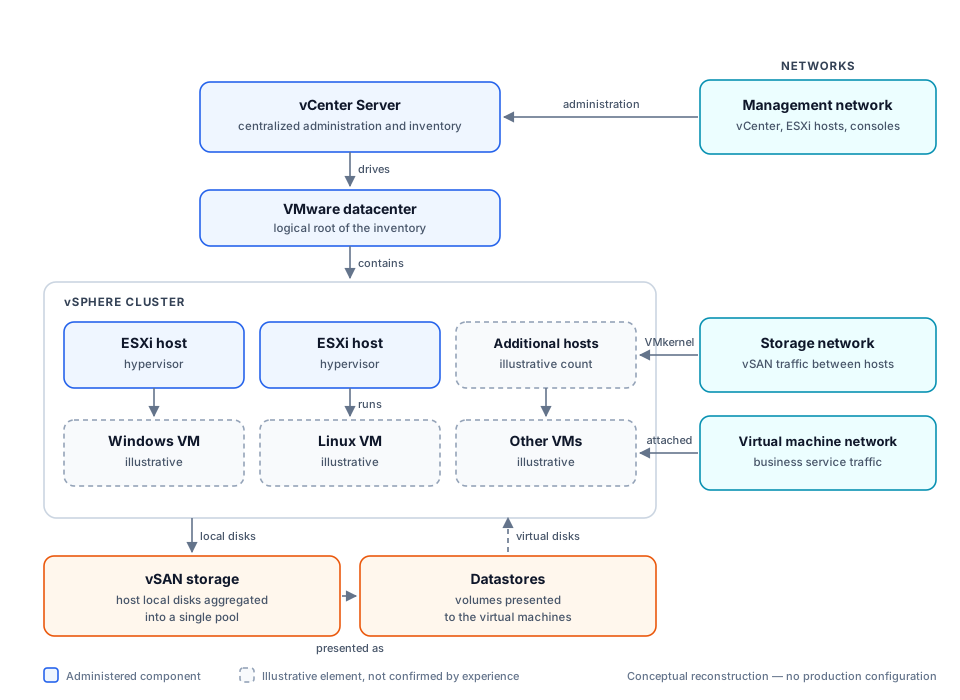
Cluster and storage organization
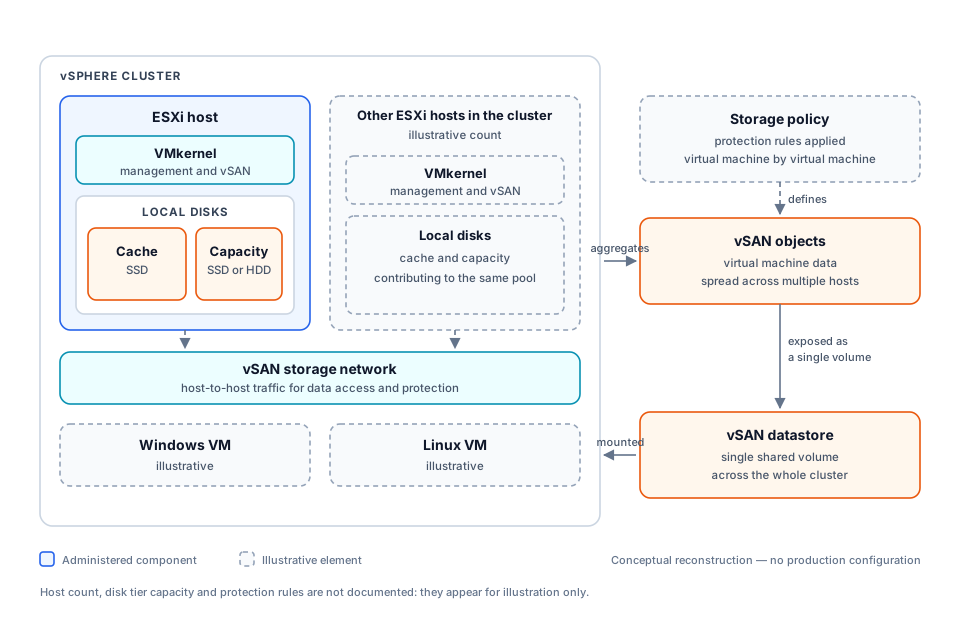
Architecture explained, component by component
vCenter Server
Role. The single administration point for the platform. It holds the inventory of every object — datacenters, clusters, hosts, virtual machines, datastores — and administration operations go through it.
Interactions. It drives ESXi hosts over the management network; it exposes the inventory to administration consoles and to PowerCLI scripts.
Administration functions. Creating and organizing the inventory, managing permissions, tracking events and alarms, operating on virtual machines, running scheduled tasks.
Availability and performance. vCenter is a concentration point: losing it does not stop the virtual machines, which keep running on their hosts, but it deprives the team of centralized functions — which is why it must be backed up and monitored as a critical service in its own right.
VMware datacenter
Role. The logical root of the inventory. It bounds the scope within which objects can be associated with one another.
Interactions. It contains clusters, hosts and datastores, and acts as the boundary for object moves.
Administration functions. Structuring the inventory, applying permissions and organizational patterns to a coherent set of objects.
Availability and performance. A purely logical object with no direct performance impact. Clear structure still matters operationally: it determines how readable the inventory is and how accurately rights are granted.
vSphere cluster
Role. A group of ESXi hosts administered collectively, pooling their compute and memory resources.
Interactions. It groups the hosts, carries the virtual machines and defines the boundary of the vSAN storage pool.
Administration functions. Adding and removing hosts, configuring shared settings, tracking overall resource consumption, managing available capacity.
Availability and performance. The cluster is where headroom is decided: insufficient spare capacity leaves the infrastructure unable to absorb the loss of a host or a load spike. Capacity tracking is therefore a continuous administration task, not a calculation done once at purchase time.
ESXi hosts
Role. Hypervisors installed on the physical servers. They run the virtual machines and expose their hardware resources — processors, memory, network cards, disks.
Interactions. They are driven by vCenter over the management network, run the virtual machines attached to the production network, and contribute their local disks to the vSAN pool over the storage network.
Administration functions. Hypervisor patching, network and storage configuration, maintenance mode handling, hardware health monitoring, CPU and memory consumption tracking.
Availability and performance. A host is a failure domain: every virtual machine it runs stops with it, absent a recovery mechanism. Hardware monitoring and handling interventions through maintenance mode are the two most direct administrative levers on availability.
Windows and Linux virtual machines
Role. Logical servers carrying the business services. Each has its own virtual processors, memory, virtual disks and network interfaces.
Interactions. They run on an ESXi host, store their disks in a datastore and connect to the virtual machine network.
Administration functions. Creation from templates, resource sizing, snapshots, hot and cold modification, decommissioning and cleanup of the associated disks.
Availability and performance. Oversizing one virtual machine costs every other one: excess virtual processors lengthen scheduling waits on the host. Adjusting resources against observed consumption is therefore recurring administration work, not an initial setting.
Management network
Role. A dedicated network for administration traffic between vCenter, the ESXi hosts and the consoles.
Interactions. It connects vCenter to the hosts and carries administrative access.
Administration functions. Configuring management VMkernel interfaces, controlling access, verifying host reachability.
Availability and performance. Keeping it separate from production traffic is basic hygiene: a saturated production network must not prevent administering the platform, especially during an incident when host access is precisely what is needed.
Virtual machine network
Role. The network through which virtual machines deliver their services to users and branches.
Interactions. It connects virtual machine interfaces to the organization’s network and the regional WAN.
Administration functions. Defining port groups, assigning virtual machines, keeping configuration consistent across every host in a cluster.
Availability and performance. Network configuration that diverges from one host to another is a classic cause of outage: a virtual machine restarted on a misconfigured host loses connectivity. Consistency across hosts is an operational requirement.
Storage network
Role. A dedicated network for vSAN traffic between the hosts in the cluster.
Interactions. It carries host-to-host exchanges for data access and protection.
Administration functions. Configuring storage VMkernel interfaces, isolating the traffic, verifying available bandwidth.
Availability and performance. This is the most sensitive network in a vSAN cluster: a virtual machine’s data does not necessarily sit on the host running it, so any latency or loss on this network translates immediately into application latency.
Datastores
Role. Logical volumes presented to the hosts, holding virtual disks, configuration files and virtual machine snapshots.
Interactions. They are backed by the underlying storage — here the vSAN pool — and mounted by the hosts in the cluster.
Administration functions. Tracking free space, placing virtual machines, cleaning up snapshots and orphaned disks.
Availability and performance. A full datastore suspends the virtual machines writing to it. Snapshots left in place are the most frequent cause of that saturation, which makes space tracking a priority operational task.
vSAN storage
Role. Distributed storage built into vSphere: it aggregates the local disks of the cluster hosts into a single pool instead of relying on an external array.
Interactions. It consumes the hosts’ local disks, relies on the storage network for host-to-host exchanges, and presents itself to the virtual machines as a single datastore.
Administration functions. Tracking pool health, monitoring capacity, replacing failed disks, applying storage policies to virtual machines.
Availability and performance. The pool’s resilience depends on how many hosts contribute to it and on the protection policy applied. Two practical operational consequences: taking a host out for maintenance temporarily reduces data protection, and usable capacity is noticeably lower than the raw capacity installed.
Technical achievements
- VMware environment administration: vSphere clusters, ESXi hosts and vCenter server, throughout the engagement.
- Virtual machine lifecycle management, Windows and Linux: creation, sizing, modification and decommissioning.
- Cluster resource management: allocating and arbitrating CPU, memory and datastores across virtual machines.
- Contribution to vSAN administration for the cluster’s distributed storage.
- Complementary Hyper-V virtualization for part of the Windows server estate, alongside the vSphere platform.
- Disaster recovery and backup: replication monitoring and backup oversight, detailed in the Business continuity and virtual machine protection case study.
- PRTG monitoring of the infrastructure and the regional WAN, to catch degradation before users report it.
- PowerShell and PowerCLI automation of recurring administration and inventory tasks.
- Documented operating procedures, to the standard required by ISO 9001 certification.
- Budget and procurement management for the IT and network equipment the platform required.
Demonstrated skills
| Area | How it was applied on this engagement |
|---|---|
| VMware vSphere administration | Day-to-day platform operations for close to seven years |
| ESXi and vCenter administration | Hypervisors and centralized administration server |
| Cluster management | Host grouping, shared settings, capacity tracking |
| Virtual machine management | Full lifecycle, Windows and Linux |
| Resource management | CPU, memory and storage arbitration |
| vSAN virtualized storage | Contribution to administering the distributed pool |
| Enterprise infrastructure operations | Monitoring, backup, disaster recovery, documented procedures, budget |
Result
- A centralized virtualized platform serves the entire 119-branch network.
- Operating processes are documented, which satisfies ISO 9001 certification requirements.
- Administered scope: hosts, virtual machines, storage and virtual networks monitored as part of operations.
- vSphere version: versions and upgrade timeline not published to protect the production context.
- Service availability: regular monitoring and alert handling, with no internal indicator published.
Visuals and evidence
Both diagrams above are conceptual reconstructions produced for this portfolio; their sources are versioned alongside the site.
Conceptual diagrams replace production screenshots so that no hostname, IP address or internal inventory is published.