
Québec Ministry of Cybersecurity and Digital Technology (MCN) and La Poste du Burkina Faso
SUP-01 — Automating Windows support and diagnostics with PowerShell
Read-only automation of Windows checks: connectivity, services, logs, software inventory, versions, SCCM/MECM client and Windows Update. The project builds on documented work — silent installs, inventory, version checks, patches and remediation scripts.
- Period
- 2015 – present
- My role
- Systems and infrastructure administrator / IT support N2-N3
- Organization
- Québec Ministry of Cybersecurity and Digital Technology (MCN) and La Poste du Burkina Faso
Technologies
- PowerShell
- Windows 10/11
- Active Directory
- SCCM / MECM
- WinRM
- Windows Update
On this page
Summary
SUP-01 turns Windows support and administration activities I carried out at the Québec Ministry of Cybersecurity and Digital Technology and La Poste du Burkina Faso into a PowerShell demonstration toolkit: silent application installs, application version checks, software inventory, patch application and remediation scripting. The toolkit automates N2/N3 first-line checks — connectivity, services, logs, SCCM/MECM and Windows Update — and returns structured results in an HTML report. It is deliberately read-only: it diagnoses and recommends, but never applies a correction without human validation.
Windows-Support-Toolkit repository, its ten functions, diagrams and HTML report are a personal technical demonstration created for this portfolio. It contains no employer code, settings or data.Business and technical context
In a Windows estate managed through Active Directory and SCCM/MECM, an endpoint incident is rarely one question. An application may not deploy because the endpoint is unreachable, WinRM is closed, a service has stopped, the SCCM client has no management point, the update source cannot be reached, or the application version is non-compliant.
The N2/N3 support problem is therefore not a lack of commands: it is their fragmentation and the lack of a consistent record. SUP-01 runs checks in diagnostic order, returns one result format for every check and produces a report that can be attached to an incident.
Automation objectives
- Turn repeated manual checks into a readable, repeatable sequence.
- Distinguish an unreachable endpoint from a check that genuinely failed, using
Ignore. - Verify access prerequisites before querying a remote endpoint.
- Inventory software and compare versions against a required minimum.
- Diagnose conditions preventing an SCCM/MECM client from receiving policy or deployments.
- Produce useful support output without disclosing passwords or running destructive remediation.
Documented responsibilities
- Silent application installation.
- Application version checks.
- Software inventory.
- Patch application.
- Development of remediation scripts.
These activities are the professional foundation of SUP-01. The toolkit does not claim to be a production script used by either organization; it makes the method visible: prerequisites, controlled collection, readable results, recommendations and traceability.
Logical architecture
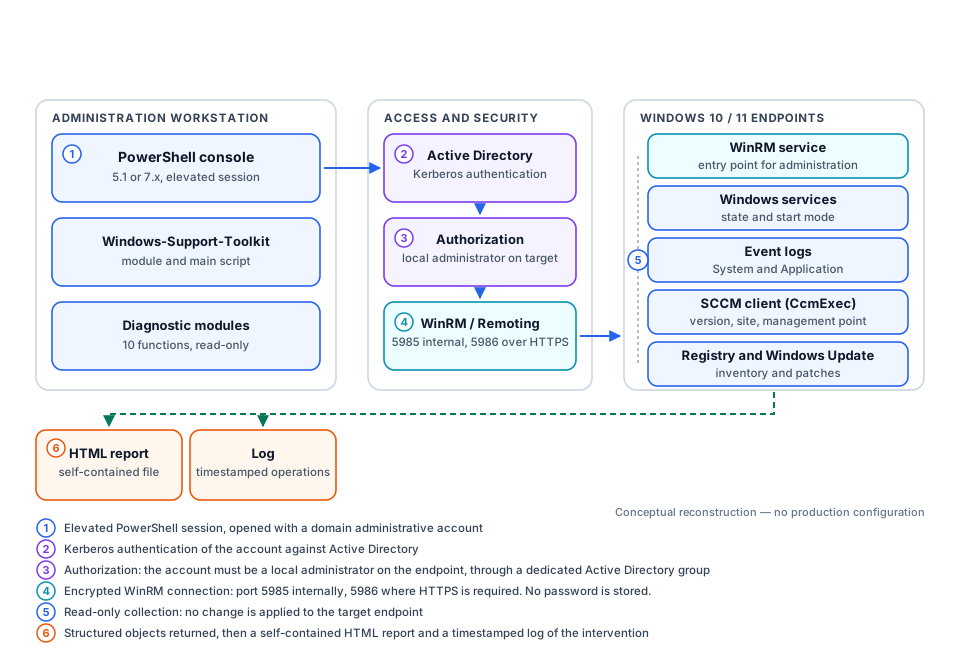
Access conditions and security
- The operator opens an elevated PowerShell session with an authorized account.
- Active Directory authenticates that account; no password is written into code or logs.
- The account must be a local administrator on the target endpoint, preferably through a dedicated AD group.
- WinRM / PowerShell Remoting must be enabled and permitted by firewall. Port 5985 is typical inside a trusted network; port 5986 is preferred where HTTPS is required.
- The toolkit reads information only; it changes no service, policy or firewall rule.
Diagnostic process
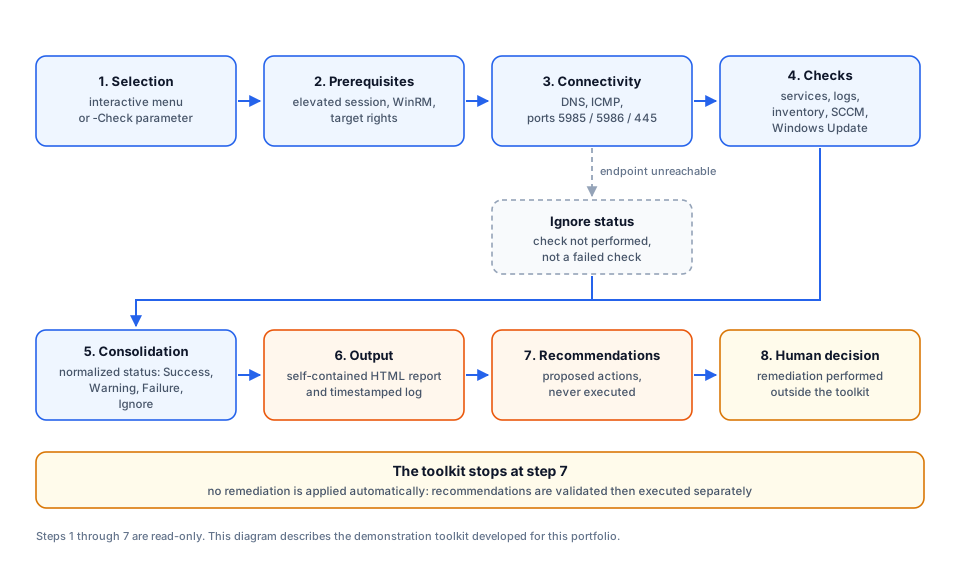
Ignore status avoids interpreting lack of access as a failure of the component being checked. The toolkit stops at recommendations. Open full-size diagramTechnical demonstration: Windows-Support-Toolkit
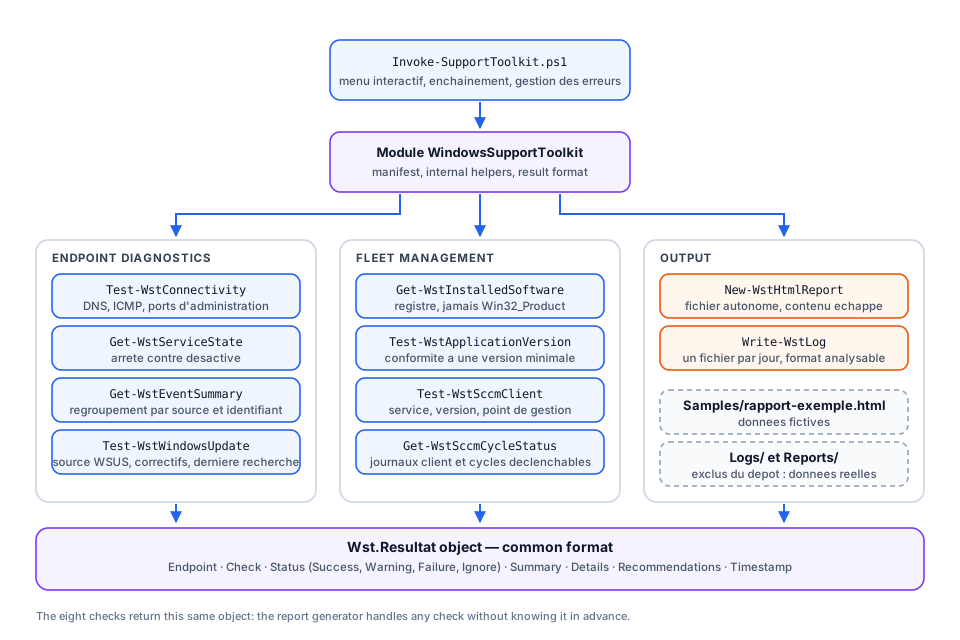
The local repository is ready for publication: C:\Users\Utilisateur\Documents\Windows-Support-Toolkit.
GitHub link to complete after publication: Windows-Support-Toolkit
# Interactive menu, local computer
.\Invoke-SupportToolkit.ps1

# Targeted diagnostic linked to an incident
.\Invoke-SupportToolkit.ps1 -ComputerName PC-0042 `
  -Check Connectivite,Services,SCCM `
-Context 'INC0012345'| Area | Function | What it checks |
|---|---|---|
| Access | Test-WstConnectivity | DNS, ICMP, WinRM and SMB ports |
| Windows | Get-WstServiceState | Stopped or disabled services |
| Windows | Get-WstEventSummary | Grouped errors and critical events |
| Fleet | Get-WstInstalledSoftware | 32/64-bit registry and per-user installs, never Win32_Product |
| Fleet | Test-WstApplicationVersion | Compliance with a minimum version |
| SCCM | Test-WstSccmClient | CcmExec, version, site, management point and log |
| SCCM | Get-WstSccmCycleStatus | Client logs and documented cycles, not executed |
| Patching | Test-WstWindowsUpdate | WSUS/SCCM source, scan and patches |
| Output | New-WstHtmlReport | Self-contained HTML report |
| Traceability | Write-WstLog | Timestamped daily log |
Example report
The report is generated from fictional laboratory data only: PC-0042, PC-0043, LABO domain and 192.0.2.0/24, a documentation-only address range. No real endpoint, account or address is published.
Technical accomplishments in the demonstration
- PowerShell 5.1 and 7 compatible module, without external dependency.
- Ten documented functions, one per file.
- Prerequisite verification; an inaccessible endpoint returns an actionable state rather than a raw exception.
- Common
Wst.Resultatobject: endpoint, check, status, summary, details, recommendations and timestamp. - Registry-based software inventory — never
Win32_Product, which can trigger MSI reconfiguration. - Self-contained HTML report with encoded content.
- Operation logging with no password or real demonstration data in the repository.
- Real local validation: module import, all ten functions, fictional report generation and reproducibility check.
Demonstrated skills
| Area | Demonstration |
|---|---|
| PowerShell | Module, advanced functions, error handling, structured objects and orchestration script |
| Windows 10/11 | Services, logging, registry, patches and Windows Update |
| Active Directory | Kerberos authentication and group-based authorization |
| N2/N3 support | Diagnostic order, failure versus unperformed check, actionable recommendations |
| SCCM/MECM | Client health, management point, logs, cycles and software inventory |
| Administration security | Elevation, WinRM, no embedded password, no automatic remediation |
| Documentation | GitHub README, diagrams, PowerShell help and example HTML report |
Verifiable results
- Independent local Git repository created:
Windows-Support-Toolkit. - 10 PowerShell functions exported; every script parsed successfully by the PowerShell parser.
- Read-only controls executed locally in a lab: connectivity, services, logs, inventory, SCCM client, SCCM logs, Windows Update and version comparison.
- Fictional HTML report generated twice with identical SHA-256 hash: reproducible result.
- No quantified productivity claim: it would depend on estate size, permissions, SCCM maturity and support process.
Documentation and publication
Diagrams, README and the example HTML report are the demonstration documentation. Before GitHub publication, replace [TO-COMPLETE] with your GitHub identifier; never add organization data to the repository.